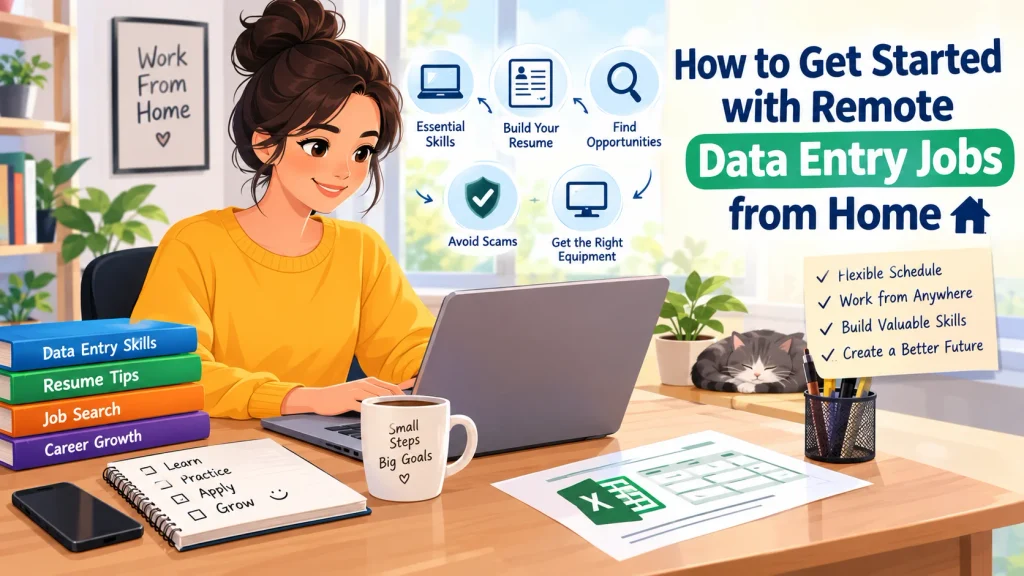
Working from home has changed the way many people think about employment. For some, it means avoiding a long commute. For others, it offers the flexibility to organize work around personal responsibilities or explore a new career direction without immediately committing to a highly specialized field.
One option that frequently attracts beginners is Remote Data Entry Jobs.
At first glance, data entry may seem like nothing more than typing information into a computer. In practice, however, reliable data entry involves considerably more than keyboard speed. Accuracy matters. So does concentration. You need to understand instructions, keep files organized, spot inconsistencies, and handle routine tasks without allowing small errors to accumulate.
There is another side to the process, too: finding legitimate opportunities.
Because remote work has become increasingly popular, job seekers may encounter advertisements that make unrealistic promises or request money and sensitive information before providing meaningful employment details. Knowing how to evaluate an opportunity is therefore just as important as knowing how to perform the work itself.
The encouraging part is that you do not necessarily need advanced technical training to begin preparing for remote data entry work. With basic computer knowledge, spreadsheet skills, attention to detail, an honest resume, and a sensible job-search strategy, you can build a foundation for entry-level opportunities.
This guide explains what remote data entry jobs involve, which skills employers may look for, how to prepare your resume, where to search, what equipment may be required, and how to recognize potentially suspicious job offers.
Table of Contents
What Are Remote Data Entry Jobs?
Remote data entry jobs are positions in which employees or contractors enter, update, organize, review, or verify information using digital systems while working away from the employer’s physical office.
The exact work can differ substantially from one position to another.
One employer might need someone to transfer information from forms into a database. Another may need help maintaining spreadsheets, updating customer records, organizing electronic documents, or checking existing information for errors. A third position could combine data entry with administrative support or document management.
Typical responsibilities may include:
- Entering information into databases
- Updating spreadsheets
- Transferring information from one format to another
- Checking records for errors
- Organizing digital documents
- Updating customer or product information
- Reviewing forms for completeness
- Maintaining basic records
- Working with spreadsheet or database software
Some roles are highly repetitive. Others are more varied and may include administrative support, research, customer communication, or document handling.
That distinction matters.
A job title alone does not tell you everything about a position. Before applying, read the complete description so you understand what the employer actually expects from the person they hire.
What Does a Remote Data Entry Worker Do?
There is no single standard workday for a remote data entry employee. Responsibilities depend on the company, industry, software, and type of information being handled.
Consider a simple example.
A company might receive hundreds of customer forms containing names, contact details, account information, or other records. A data entry worker could review those forms, identify the required information, and transfer it into the company’s database.
Another worker might maintain an inventory spreadsheet. Their responsibilities could include updating product names, quantities, prices, reference numbers, or other details whenever the company provides new information.
The work can sound straightforward—and sometimes it is—but consistency is essential.
A small mistake in a name or product code may create confusion later. An incorrect number can affect a report. A missing field can make a record incomplete.
Most importantly, data entry is not one standardized job. Responsibilities can range from simple keyboard-based tasks to broader administrative duties. Always examine the full job description before deciding whether a position matches your skills and expectations.
Skills You Need for Remote Data Entry Jobs
You do not necessarily need programming knowledge or advanced technical qualifications to begin learning data entry. Still, a handful of practical skills can make the work much easier and help you present yourself more effectively to potential employers.
1. Accurate Typing
Typing quickly is useful, particularly when a position involves repetitive information entry. But speed should not come at the expense of accuracy.
A worker who types 70 words per minute while repeatedly entering incorrect information can create more problems than someone who works more slowly and produces dependable records.
Accuracy comes first.
Practice typing while paying attention to both speed and error rates. Over time, efficiency should improve naturally as you become more comfortable with the keyboard and the types of tasks involved.
2. Attention to Detail
Data entry often involves information that looks ordinary but needs to be handled carefully.
Names. Addresses. Dates. Numbers. Product codes. Reference IDs.
A single misplaced character can change the meaning of a record. That is why attention to detail is one of the most useful qualities for this type of work.
Develop a simple habit: check your work before submitting it whenever the workflow allows.
3. Basic Spreadsheet Skills
Spreadsheet software is commonly used in administrative and data-related work.
You do not need to master every advanced feature before applying for an entry-level position. However, you should be comfortable with basic tasks such as:
- Entering and formatting information
- Sorting data
- Filtering records
- Adjusting rows and columns
- Using simple formulas
- Saving and organizing files
The goal is not to become a spreadsheet expert overnight. It is to reach the point where everyday spreadsheet tasks feel familiar rather than intimidating.
4. Computer Literacy
Remote workers need to be comfortable with ordinary computer tasks.
That includes downloading files, creating folders, attaching documents to emails, navigating websites, organizing information, and moving between different applications.
You may also encounter minor technical problems while working remotely. Being able to troubleshoot basic issues independently can save time and reduce unnecessary interruptions.
5. Written Communication
Data entry may involve relatively little customer interaction, but communication still matters.
You may receive instructions from a supervisor, ask a question through email, clarify an unclear requirement, or provide an update through a workplace messaging system.
Clear communication makes those exchanges easier.
6. Organization
Working remotely often means managing your own workspace, files, tasks, and deadlines.
Without an organized system, small things can quickly become difficult to track.
Keep instructions accessible. Name files clearly. Organize folders logically. Track deadlines. These simple habits can reduce avoidable mistakes and make repetitive work much more manageable.
Do You Need Experience for Remote Data Entry Jobs?
Not necessarily.
Some entry-level positions may accept candidates who have never held a formal data entry job. That does not mean employers expect applicants to have no useful abilities, however.
They may still look for basic computer literacy, accuracy, reliability, organization, and the ability to follow instructions.
If you do not have direct data entry experience, look more broadly at what you have already done.
Relevant transferable experience might include:
- Office administration
- Customer service
- School or university projects
- Spreadsheet management
- Inventory records
- Document organization
- Virtual assistance
- Reception or clerical work
The important thing is honesty.
Do not turn a small amount of spreadsheet practice into “professional data management experience.” Instead, explain the actual responsibility you performed and show how it relates to the position.
A truthful resume is more useful than an impressive-sounding one that cannot be supported.
How to Get Started with Remote Data Entry Jobs
Starting a remote job search can feel overwhelming if you approach every listing at once. A more practical strategy is to build your skills first, prepare your application materials, and then search deliberately.
Here is a straightforward process.
Step 1: Learn the Basics
Before applying, become comfortable with the everyday tools commonly used in administrative work.
Practice:
- Word processing
- Spreadsheets
- File management
- Online forms
- Basic document formatting
You can create your own exercises at home.
For example, make a spreadsheet containing fictional products, quantities, prices, and reference numbers. Then practice sorting the information, filtering records, changing formatting, checking entries, and organizing the file.
It does not need to be complicated.
The purpose is simply to become comfortable performing the kinds of basic tasks that may appear in real work.
Step 2: Improve Your Typing Accuracy
Regular practice can make keyboard-based work feel faster and more natural.
However, do not focus exclusively on words per minute.
Accuracy matters just as much.
A simple practice routine can look like this:
- Type a short passage.
- Review the mistakes you made.
- Repeat the exercise.
- Gradually increase your speed while maintaining accuracy.
The objective is not to chase an impressive typing number. It is to become consistently accurate while working at a comfortable pace.
Step 3: Build a Simple Resume
Your resume should make your relevant abilities easy to identify.
If you have no direct data entry experience, emphasize transferable skills instead of leaving your experience section empty.
For example, rather than writing only:
“Good computer skills”
you could describe a genuine responsibility:
“Maintained and organized spreadsheet records for coursework and administrative tasks.”
The second statement provides context. It tells the reader what you actually did.
Most importantly, only include claims that accurately represent your experience.
Step 4: Create a Professional Work Profile
Depending on the type of work you are pursuing, you may search through job boards, professional networking platforms, freelance marketplaces, or company career pages.
Wherever you create a profile, keep the information consistent with your resume.
Your description might highlight skills such as:
- Data entry
- Spreadsheet organization
- Document formatting
- Administrative support
- File management
- Basic computer skills
Avoid describing yourself as an expert in tools or tasks you have never used.
A straightforward profile is often more credible than a collection of exaggerated claims.
Step 5: Search for Relevant Positions
Do not rely on a single search phrase.
Employers use different job titles for similar responsibilities, so expanding your search terms can help you find a wider range of relevant opportunities.
Try searches such as:
- Remote data entry
- Entry-level data entry
- Data entry clerk remote
- Remote administrative assistant
- Virtual data entry
- Data processing assistant
- Remote records assistant
- Spreadsheet data entry
You may discover that a position containing substantial data entry work does not actually have “data entry” in its title.
Step 6: Read Job Descriptions Carefully
Before applying, examine the details.
Pay attention to:
- Required skills
- Working hours
- Employment type
- Location restrictions
- Software requirements
- Expected responsibilities
- Application instructions
- Compensation structure
A position advertised as “data entry” may also include customer service, research, sales support, document management, or general administration.
That does not automatically make the opportunity unsuitable. It simply means you should know what you are actually applying for.
Step 7: Prepare for Interviews or Assessments
Some employers may ask applicants to complete a typing test, spreadsheet exercise, accuracy assessment, or practical data-entry task.
The best preparation is hands-on practice.
Rather than memorizing theoretical answers, practice realistic activities and be prepared to explain how you approach your work.
During an interview, you may need to discuss:
- How you maintain accuracy
- How you stay organized during repetitive tasks
- Which software you know
- What you do when instructions are unclear
- How you check completed work
- How you manage deadlines while working remotely
The interviewer may be less interested in hearing that you “never make mistakes” than in understanding what process you use to catch and correct them.
Where Can You Look for Remote Data Entry Jobs?
Remote opportunities can appear in several places, and using more than one source can make your search more flexible.
Company Career Pages
If there are particular companies you are interested in, visit their official career pages directly.
This gives you a way to confirm that a position actually exists and lets you see the employer’s stated application process.
It can also help you avoid relying entirely on third-party advertisements.
Established Job Boards
General job-search websites may list remote data entry, administrative, clerical, and records-related positions.
Use filters for remote work where available, but do not assume every listing is automatically suitable or legitimate.
Read each advertisement carefully.
Professional Networking Platforms
Professional networking websites can help you discover employers, recruiters, administrative roles, and other remote opportunities.
A complete profile can make it easier for someone reviewing your information to understand what you can offer.
Keep your profile current and make sure the skills listed there match the information on your resume.
Freelance Platforms
Freelance marketplaces may contain short-term data entry projects, spreadsheet tasks, document organization work, and similar assignments.
These projects can sometimes help beginners develop practical experience. However, availability, competition, platform fees, client expectations, and working arrangements vary considerably.
Before accepting a project, review the platform’s current rules and terms.
How to Recognize Suspicious Job Offers
Remote job seekers should be cautious when evaluating unexpected offers, particularly advertisements that promise unusually high income for minimal effort.
A legitimate employer should normally be able to explain the company, position, responsibilities, hiring process, and compensation arrangement clearly.
Be particularly cautious if a supposed employer:
- Promises unusually large amounts of money for very little work
- Pressures you to make an immediate decision
- Requests payment to access a job
- Tells you to purchase expensive equipment directly from them
- Requests sensitive personal information before it is reasonably necessary
- Uses vague job descriptions while emphasizing guaranteed income
- Communicates exclusively through suspicious or difficult-to-verify channels
These warning signs do not mean every unusual job advertisement is automatically fraudulent. Context matters.
Still, unexpected offers deserve verification.
Research the company independently. Look for an official website and career page. Check whether the position appears through a legitimate source. Be especially careful before sending money or sensitive information.
If an opportunity requires you to pay before you can supposedly begin working, stop and investigate thoroughly rather than assuming the request is legitimate.
What Equipment Do You Need?
Equipment requirements vary according to the employer and the nature of the position.
For many remote administrative roles, you may need:
- A reliable computer
- A stable internet connection
- A keyboard and mouse
- A quiet workspace
- Email access
- Spreadsheet or office software
- Basic file-storage capabilities
Some employers provide equipment. Others expect workers to supply their own.
Do not rush out and purchase expensive equipment simply because an advertisement tells you that you need it. First, verify the employer, confirm the position, and determine what equipment is genuinely required.
A professional opportunity should be understandable before you spend significant money preparing for it.
Advantages of Remote Data Entry Work
Remote data entry can offer several practical advantages, especially for people who prefer structured, computer-based work.
Location Flexibility
Depending on the employer’s requirements, you may be able to work from home instead of traveling to a physical office every day.
That can reduce commuting time and provide greater control over your working environment.
However, remember that remote does not always mean work from anywhere.
An employer may restrict applicants to particular countries, regions, or time zones.
Accessible Skill Set
Many entry-level data entry positions rely on basic computer and administrative abilities rather than highly specialized technical knowledge.
That can make the field approachable for people who are still building their professional skill set.
Structured Responsibilities
Some people prefer work with clearly defined procedures and repeatable tasks.
For those workers, structured data entry responsibilities may feel more comfortable than jobs requiring constant creative decision-making or unpredictable interaction.
Opportunity to Develop Transferable Skills
Data entry can help you strengthen skills that are useful in other areas of work.
These may include:
- Organization
- Spreadsheet use
- Record management
- Administrative support
- Accuracy
- Written communication
- Digital file management
Those abilities can later support transitions into administrative support, operations, customer service, records management, or other office-related roles.
Limitations to Consider
Working from home does not automatically make data entry easy, highly paid, or suitable for everyone.
There are several limitations worth considering before you commit to this career path.
Repetitive Work
Some data entry positions require workers to enter similar information for extended periods.
That repetition may be comfortable for someone who enjoys predictable routines. For others, it can become monotonous.
Think about the type of work you naturally prefer before deciding that data entry is the right fit.
Competition
Entry-level remote jobs can attract a large number of applicants.
Consequently, a generic resume may struggle to communicate why you are a suitable candidate.
Make your relevant skills visible. If the employer emphasizes spreadsheets, mention your spreadsheet experience. If accuracy is central to the role, describe responsibilities that demonstrate careful record handling.
Income Varies
Compensation can differ according to several factors, including:
- Location
- Employer
- Experience
- Employment arrangement
- Responsibilities
- Type of work
Be cautious with advertisements suggesting that everyone can earn a specific amount regardless of these factors.
A realistic opportunity should explain its compensation structure clearly.
Limited Career Growth in Some Roles
Some data entry positions have narrowly defined responsibilities and may offer limited opportunities to expand your role.
If you want broader career options over time, consider developing related skills such as:
- Spreadsheet analysis
- Bookkeeping
- Project coordination
- Customer support
- Office administration
- Database fundamentals
The more useful skills you can combine, the more types of roles you may eventually be able to pursue.
How to Improve Your Chances of Getting Hired
A few practical changes can make your job applications clearer and more relevant.
Keep Your Resume Focused
A resume does not need to contain every task you have ever completed.
Focus on information that connects to the position.
Relevant abilities might include:
- Computer literacy
- Accuracy
- Organization
- Administrative experience
- Spreadsheet knowledge
- Document management
- Communication
Make the important information easy to find.
Customize Applications
One resume can serve as a foundation, but individual applications may benefit from small adjustments.
If a position emphasizes spreadsheet experience, make your spreadsheet skills prominent.
If the role focuses on document management, highlight your experience organizing and handling digital documents.
The goal is not to rewrite your entire resume every time. It is to make the connection between your experience and the employer’s requirements obvious.
Build a Small Practice Portfolio
If you do not have professional experience, practice projects can demonstrate that you understand the basics.
For example, you could create:
- A properly formatted spreadsheet
- A sample inventory table
- A fictional customer-record database
- A document organization example
Clearly label these as practice projects.
Never present fictional work as professional experience. The purpose of a practice portfolio is to demonstrate what you can do, not to manufacture a work history.
Keep Learning
Office-based data work continues to change as organizations adopt new software and digital workflows.
Once you are comfortable with basic data entry, consider expanding your skills.
You might learn additional spreadsheet functions, explore basic database concepts, or become more familiar with administrative software.
You do not need to learn everything simultaneously.
Build one useful skill at a time.
Remote Data Entry vs. Other Remote Jobs
Data entry is only one category within the broader remote-work market.
Different roles can overlap, but their everyday responsibilities may look quite different.
| Job Type | Common Skills | Typical Work Style |
|---|---|---|
| Data Entry | Accuracy, typing, spreadsheets | Structured and repetitive |
| Virtual Assistance | Organization, communication | Varied administrative tasks |
| Customer Support | Communication, problem-solving | Customer-facing |
| Transcription | Listening, typing, accuracy | Audio-to-text work |
| Bookkeeping | Accounting knowledge, spreadsheets | Financial record management |
| Content Support | Writing, editing, research | More creative and varied |
The boundaries between these roles are not always strict.
For instance, a virtual assistant might spend part of the day entering information into spreadsheets while also responding to emails, scheduling appointments, and organizing documents.
That is why reading the complete job description is so important. The title tells you what the employer calls the position; the responsibilities tell you what you will actually do.
Common Mistakes Beginners Should Avoid
Starting a remote job search can be frustrating when every advertisement looks like a potential opportunity.
A more careful approach can save time—and help you avoid unnecessary risks.
Here are several mistakes beginners should avoid.
Applying Without Reading the Requirements
Sending the same application to every remote listing may feel efficient, but it often produces poor results.
Before applying, check whether your skills, location, availability, and experience match the employer’s requirements.
A few minutes of careful reading can prevent a great deal of wasted effort.
Focusing Only on Typing Speed
Typing speed is useful, but it is not the entire job.
Accuracy, organization, communication, reliability, and the ability to follow instructions can matter just as much.
Do not build your entire application around one number.
Paying for a Job Opportunity Without Verification
Be extremely cautious if an employer or recruiter asks you to pay money before providing legitimate employment details.
Research the organization independently and verify the opportunity before sending payment.
Exaggerating Your Experience
It may be tempting to make your resume sound more impressive than it really is.
Resist that temptation.
It is better to say that you are learning a particular skill than to claim professional experience you cannot demonstrate.
Honest applications give you a stronger foundation for interviews and future work.
Ignoring the Employment Arrangement
Not every remote opportunity is an employee position.
Some are contractor roles. Others are freelance projects.
Understand which arrangement you are considering because responsibilities, schedules, payment structures, and expectations can differ.
Frequently Asked Questions
1. Can I get a remote data entry job with no experience?
Yes, some entry-level positions may accept applicants without previous professional data entry experience.
However, employers can still expect basic computer skills, accuracy, organization, reliability, and the ability to follow instructions. Demonstrating those abilities can strengthen your application even when your previous job title was not “data entry clerk.”
2. What skills are most important for remote data entry?
Useful skills include accuracy, attention to detail, typing ability, basic spreadsheet knowledge, computer literacy, organization, and communication.
The relative importance of each skill depends on the employer and the specific responsibilities of the position.
3. Do remote data entry jobs require a degree?
Not necessarily.
Educational requirements vary between employers. Some positions may not require a degree, while others may list particular educational or professional qualifications.
Always check the individual job description instead of assuming that every data entry role has the same requirements.
4. Is remote data entry a good option for beginners?
It can be a practical way to develop computer and administrative experience, particularly if you prefer structured and repetitive tasks.
However, responsibilities, compensation, competition, and opportunities for career development vary considerably from one position to another.
5. How can I avoid fake remote data entry jobs?
Research the employer independently and, whenever possible, verify the position through the company’s official career page.
Read the job description carefully. Pay attention to requests for upfront payments, sensitive personal information, vague descriptions, unrealistic income promises, or pressure to make an immediate decision.
When something seems unclear, verify it before proceeding.
Conclusion
Getting started with Remote Data Entry Jobs does not require you to know everything from the beginning.
What matters more is building a reliable foundation.
Improve your typing accuracy. Become comfortable with spreadsheets and everyday computer tasks. Learn how to organize digital files. Create an honest resume that highlights transferable skills. Then search for opportunities carefully rather than applying to every advertisement you encounter.
The job-search process itself also requires judgment.
Remote work can provide flexibility, but flexibility comes with responsibility. You need to manage your time, follow instructions, protect your information, and evaluate opportunities carefully. Not every advertisement deserves your attention, and an offer that relies on exaggerated promises should not be accepted without verification.
Start realistically.
Apply for positions that match your current abilities, continue improving your skills, and treat each legitimate opportunity as a chance to learn. As your experience grows, you may find that the skills developed through data entry—organization, spreadsheet use, digital record management, accuracy, and communication—can open the door to broader administrative and digital-work opportunities.
The first step does not have to be complicated.
Learn the basics. Practice consistently. Apply honestly. Verify opportunities carefully. Then keep moving forward.